Kitchen and family command center
View doors, cameras, locks, music, lighting, shades, climate, and family intercom from a high-use location.

Dedicated whole-home control and intercom
A dedicated Control4 touchscreen provides immediate access to the home without locating a phone, signing into an app, or handing a personal device to a guest. T4 and T5 interfaces can present lighting, security, entertainment, climate, shades, cameras, and intercom in a consistent Control4 experience selected for the room and household.
Integrator guidance
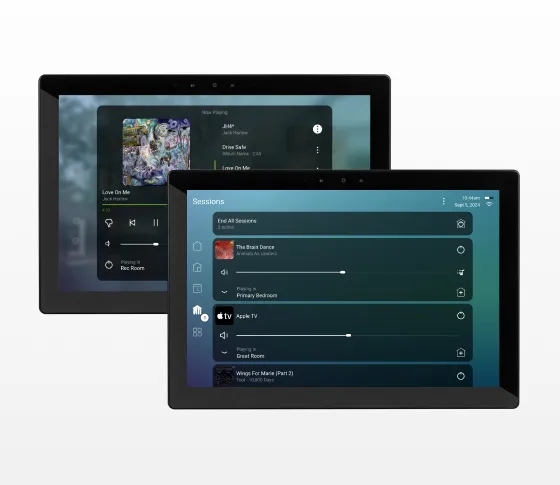
A touchscreen is most valuable at decision points: the main entrance, kitchen, primary suite, family room, security office, or a central hallway. It can show who is at the door, display cameras, start music, adjust temperature, close shades, call a scene, or communicate between rooms. Because it is dedicated, the interface remains available even when a household phone is elsewhere.
Control4 describes current touchscreens with bright high-resolution displays, fast processors, advanced microphones, and high-grade speakers. The family includes 8- and 10-inch sizes. T4 supports tabletop charging-dock and in-wall approaches in the current product story, while the current T5 is offered as an in-wall model. Finish and trim availability depends on the model and current catalog.
Davis Audio & Video determines where a touchscreen earns its place. Too many panels add cost and visual clutter; too few force the family back to phones. We coordinate mounting height, viewing angle, reflected light, power, network, wall depth, speaker audibility, privacy, and the controls that should appear on each interface.
Best locations for a Control4 touchscreen
View doors, cameras, locks, music, lighting, shades, climate, and family intercom from a high-use location.
Run Arrive and Away scenes, review security status, answer visitors, and control access before entering or leaving.
Use bedside or in-wall control for Good Night, privacy shades, temperature, music, door events, and morning scenes.
Browse media, manage lighting and comfort, and access property status without taking over the main screen.
Use dedicated control with Access Agent restrictions to limit functions to appropriate staff or guests.
Touchscreen capabilities
See active lights, locks, shades, climate zones, security information, and media from an interface that remains part of the room.
Use integrated microphone and speakers with compatible door stations, Chime, other touchscreens, cameras, and Intercom Anywhere.
Browse supported services and cover art, select rooms, manage Now Playing, and control distributed audio without using the television.
Adjust scenes, dimming, color-capable lighting, schedules, and room presets through a graphical interface.
Lock or password-protect selected functions to create safer household, guest, commercial, or staff interfaces.
Professional design
An in-wall screen is always in the same place. A tabletop model can move but depends on being returned to its dock. The room’s use determines the better experience.
Where supported, structured cabling and appropriate power are planned before walls close. A dedicated interface should not depend on marginal wireless coverage.
Viewing angle, reach, wheelchair access, children, glare, backsplash height, furniture, and door swing affect mounting location.
Davis Audio & Video organizes Favorites and room controls, limits sensitive functions, and avoids presenting every integrated device on every screen.
Background noise, room size, hard surfaces, speaker direction, privacy, and microphone placement influence communication quality.
Dedicated control across the home
Automatically present visitor video and provide a clear path to speak, unlock an approved door, raise lights, or dismiss the event.
Display live camera views and supported events on a larger, always-available screen.
Browse and control music zones with cover art, Favorites, volume, grouping, and room selection.
Give homeowners direct graphical adjustment while keypads and scenes handle the most common actions.
Specifications
| Screen sizes | 8-inch and 10-inch |
|---|---|
| T4 mounting | Tabletop with rechargeable dock and in-wall options in the current family |
| T5 mounting | Currently offered as an in-wall touchscreen |
| Display | Bright, high-resolution graphical Control4 interface |
| Audio | Integrated high-grade speakers and advanced microphone array |
| Functions | Lighting, security, cameras, media, televisions, climate, shades, scenes, intercom, and compatible devices |
| Access control | Access Agent can restrict or password-protect selected features |
| Finish options | Model-dependent black, white, and coordinating trim choices, including selected Lux-related colors |
| System | Compatible Control4 controller, supported OS, project programming, and user configuration |
|---|---|
| Network | Reliable wired or supported wireless connection, IP planning, and internet for cloud functions |
| Power | Model-appropriate power and charging/dock requirements |
| Wall installation | Correct back box, depth, orientation, backing, trim clearance, and service access |
| Intercom | Configured room names, call groups, privacy rules, camera/door station links, and tested audio |
Davis Audio & Video process
Davis Audio & Video starts with the room, the household, and the result the client expects—not with a product list. We document existing equipment, construction conditions, wiring access, network health, aesthetic priorities, security requirements, and the controls people already understand.
We select the correct Control4 or Lutron architecture, verify electrical and low-voltage requirements, coordinate with architects, designers, builders, electricians, HVAC professionals, and window-treatment workrooms, and produce a system plan that can be installed and serviced without guesswork.
Devices are mounted, wired, labeled, updated, and programmed as one operating system. Scenes, schedules, room-off behavior, notifications, user permissions, and remote interfaces are tested from the controls the family will actually use.
We verify normal operation, failure recovery, network communication, audio or video performance, and safety-related behavior. The homeowner receives a clear walkthrough focused on everyday actions. Davis Audio & Video considers the project unfinished if the system is powerful but difficult to operate.
The final configuration is documented so future service, additions, or renovations can be completed efficiently. Davis Audio & Video can support software updates, programming changes, seasonal adjustments, and expansion as the home evolves.
FAQs
Both provide dedicated Control4 interfaces in 8- and 10-inch sizes. Current Control4 information describes T4 tabletop and in-wall options, while T5 is currently offered exclusively as an in-wall touchscreen. Hardware and finish details should be verified at ordering.
A touchscreen is always available, can be placed at a shared location, supports intercom and visitor workflows, and does not require a family member’s unlocked phone. The app remains ideal for personal and remote access.
Yes, compatible cameras can be displayed. Performance depends on camera, recorder, driver, network, stream configuration, and touchscreen generation.
Yes, with compatible Control4 door stations or Chime and properly configured intercom. Approved lock or gate commands can be placed in the same workflow.
Yes. Control4 touchscreens can support room-to-room intercom and group communication when configured. Intercom Anywhere extends supported communication to mobile devices through applicable services.
The Access Agent can restrict or password-protect selected functions. Davis Audio & Video helps define which security, access, camera, or system controls each interface should expose.
Yes. The exact cabling, power, back box, and network requirements depend on the model. New-construction wiring should be planned from the current specification sheet.
A compatible tabletop T4 can be removed from its charging dock, but network coverage, battery state, household handling, and access to a dock affect practical use.
Many local Control4 functions can continue on the home network. Remote intercom, cloud services, streaming, voice, updates, and internet-dependent features may not.
There is no square-footage formula. Davis Audio & Video places them where shared, immediate, visual, or intercom control is valuable and relies on keypads, remotes, and personal apps elsewhere.
Related Davis Audio & Video resources
Next step
Davis Audio & Video can help match products to wiring, control, acoustics, networking, mounting, calibration and long-term support.