Run whole-home scenes
Use Arrive, Away, Good Night, Entertain, or Vacation scenes to coordinate lighting, shades, comfort, security, and entertainment.
Whole-home control from phone, tablet, and watch
The Control4 App can place the home’s most important controls in one consistent interface, but a successful app experience depends on how the system is named, organized, programmed, and handed off. Davis Audio & Video configures the app around everyday actions so homeowners see useful controls first and technical complexity only when it is genuinely needed.
Integrator guidance
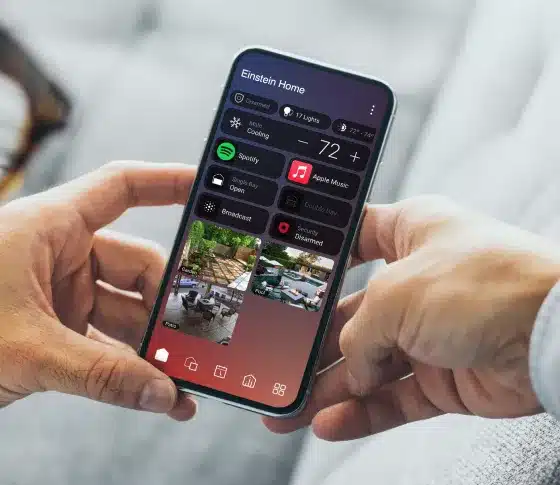
A smart-home app should answer practical questions quickly: Is the house secure? Which lights are on? What is playing? Who is at the door? What temperature is the guest room? Control4 consolidates those functions when compatible systems have been professionally integrated. The app is not a substitute for engineering; it is the interface to the engineering behind the walls and in the rack.
Homeowners can organize Favorites, move between rooms, browse supported media, activate scenes, adjust shades and climate, review cameras, and receive configured notifications. Routines can expose selected automation choices so clients can adjust timing or behavior without opening dealer programming. Control4 Connect extends the experience with remote access and other cloud-enabled services; exact entitlements depend on the current subscription and system configuration.
Davis Audio & Video limits clutter by naming sources and rooms in natural language, removing abandoned devices, choosing meaningful icons, and testing the app with the people who will use it. A “Family Room Apple TV” label is useful. “HDMI 2” usually is not. That editorial discipline is one of the most important parts of app commissioning.
What homeowners commonly do in the Control4 App
Use Arrive, Away, Good Night, Entertain, or Vacation scenes to coordinate lighting, shades, comfort, security, and entertainment.
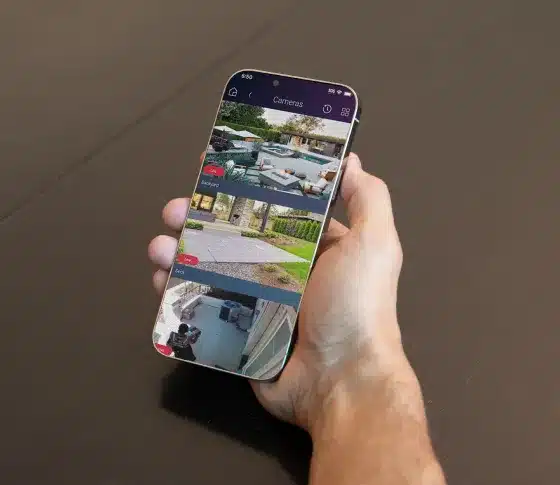
Review supported locks, cameras, sensors, thermostat settings, and device status when away, subject to internet availability and the applicable Connect services.
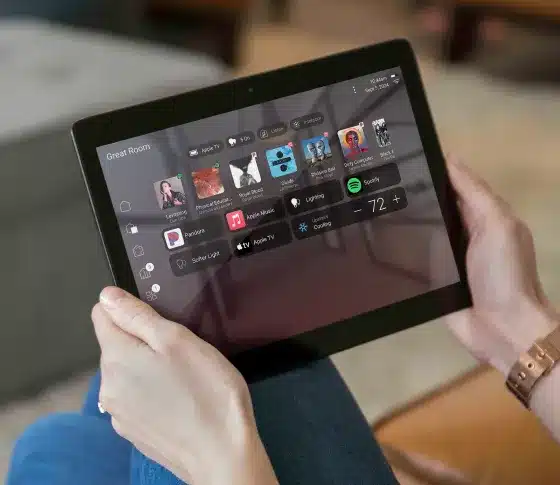
Select rooms and supported sources, browse media, see active sessions, group audio zones, and control volume from a familiar screen.
Use compatible door stations, Chime, and touchscreens for intercom and visitor communication, including Intercom Anywhere when enabled.
Favorites and homeowner-facing Routines make common commands easy to reach and allow selected schedules or automation settings to be adjusted without redesigning the system.
Control4 App capabilities Davis Audio & Video configures
Devices are grouped by the rooms people recognize, while whole-home views provide a faster way to find active lights, locks, shades, media, or climate zones.
Frequently used scenes, playlists, stations, cameras, and controls can be promoted so the first screen reflects the client’s real priorities.
Supported events can create useful notifications. Davis Audio & Video avoids noisy alerting and focuses on messages that lead to a clear action.
Homeowners can see what is playing, where it is playing, and control supported sessions without walking room to room.
Control4 Connect can provide remote access, cloud backup, voice integrations, Intercom Anywhere, Routines, proactive system alerts, and other features as offered for the installed system.
Professional design
Room names, source names, icons, and Favorites determine whether the app feels immediate or confusing. The structure should match how the household talks about the home.
Not every user needs every camera, door, security, or programming function. Davis Audio & Video reviews access requirements and uses available user controls appropriately.
A reliable local network and correctly owned customer account are essential. Credentials, subscriptions, and recovery information should belong to the client, not remain tied to an installer’s personal account.
Phones can be charging, misplaced, or offline. Keypads, remotes, thermostats, and touchscreens are selected so essential functions are still easy without the app.
The app as one part of the control strategy
The remote remains the fastest television interface, while the app handles deeper whole-home views, cameras, room selection, and remote access.
Wall buttons make lighting and scenes immediate. The app provides status, flexibility, and less frequently used adjustments.
Dedicated touchscreens create an always-available intercom and property-control point; the app extends the same system to personal devices.
Supported voice integrations can add hands-free commands. Davis Audio & Video uses voice for short, clear requests rather than replacing dependable physical controls.
Specifications
| Supported mobile platforms | Current Control4 app for compatible iOS and Android devices |
|---|---|
| Wearable access | Selected Control4 functions can be available through Apple Watch |
| Home control | Lighting, shades, climate, security, locks, cameras, audio/video, scenes, and compatible third-party devices |
| Personalization | Favorites, room organization, custom scenes, and homeowner-facing Routines |
| Communication | Intercom and visitor communication with compatible Control4 touchscreens, door stations, and Chime |
| Media | Supported source selection, browsing, room control, Now Playing, and session management |
| Notifications | Configured push notifications and proactive system alerts where supported |
| Remote access | Available through the applicable Control4 Connect service and a working internet connection |
| Control4 system | Compatible controller, current supported OS, and dealer programming |
|---|---|
| Accounts | Customer-owned Control4 account and current service entitlements |
| Network | Stable home LAN, secure Wi-Fi, reliable internet, DNS, and correct mobile permissions |
| Commissioning | App installation, sign-in, user access, notification testing, remote testing, and client training |
Davis Audio & Video process
Davis Audio & Video starts with the room, the household, and the result the client expects—not with a product list. We document existing equipment, construction conditions, wiring access, network health, aesthetic priorities, security requirements, and the controls people already understand.
We select the correct Control4 or Lutron architecture, verify electrical and low-voltage requirements, coordinate with architects, designers, builders, electricians, HVAC professionals, and window-treatment workrooms, and produce a system plan that can be installed and serviced without guesswork.
Devices are mounted, wired, labeled, updated, and programmed as one operating system. Scenes, schedules, room-off behavior, notifications, user permissions, and remote interfaces are tested from the controls the family will actually use.
We verify normal operation, failure recovery, network communication, audio or video performance, and safety-related behavior. The homeowner receives a clear walkthrough focused on everyday actions. Davis Audio & Video considers the project unfinished if the system is powerful but difficult to operate.
The final configuration is documented so future service, additions, or renovations can be completed efficiently. Davis Audio & Video can support software updates, programming changes, seasonal adjustments, and expansion as the home evolves.
FAQs
A compatible Control4 system supports local app use, but remote access and various cloud features are associated with the current Control4 Connect offering. The exact entitlement can depend on when the system was installed, its OS version, controller, and subscription status.
Yes, when remote access is enabled through the applicable Control4 service and both the home and mobile device have internet connectivity. Davis Audio & Video tests remote access before handoff.
Control4 provides personalization tools, Favorites, and user-facing options. The degree of per-user customization depends on the current software and system design. Davis Audio & Video creates a clean shared structure and then helps users personalize where supported.
Routines are homeowner-facing controls that can expose selected automation settings—such as a schedule, time, delay, or enabled state—without giving access to dealer-level programming. The integrator decides which variables are safe and useful to expose.
Often. Control4 integrates many third-party products through certified, manufacturer, or dealer-provided drivers. Compatibility is product- and model-specific and should be verified before purchase.
Compatible camera and recorder systems can be integrated for live viewing and other supported functions. Luma Insights and cloud event features have additional compatibility and subscription requirements.
Local control on the home network may continue for supported functions, but remote access, cloud services, voice integrations, notifications, and internet-based media will be limited or unavailable.
The app offers personalization and selected Routines, but system architecture, drivers, bindings, advanced programming, and major changes are completed by a Control4 integrator.
Technically it can perform many commands, but using a phone for every light, television, or bedtime action is rarely the best experience. Davis Audio & Video combines the app with purpose-built controls so each task has an intuitive interface.
We audit room and source names, remove obsolete items, review Favorites, test remote access and notifications, update supported components, and reorganize the interface around current household priorities.
Related Davis Audio & Video resources
Next step
Davis Audio & Video can help match products to wiring, control, acoustics, networking, mounting, calibration and long-term support.